Topics
Semantic HTML
- HTML 5
- BLOCK VS INLINE
- Div vs span
- Sub, hr, sup, br,
- Semantic elements
- Emmet syntax
HTML Forms and Tables
- Tables
<table> <tr> <td> <th> - Table
colspanandrowspanattributes - Table Sections
<thead>, <tfoot>, <tbody> - Form Basics
<form> - Common Input Types
<input> - Button Elements
<button> - Labels
<label> - Range & Text Areas
- Form Validations
Tutorials
- 04 Semantic HTML, videos 32 – 40
- o5 HTML Forms and Tables, videos 41 – 57
- Exercise files to publish to your server:
chickens2.html(copychickens.htmlfrom week 1 and continue work on it for semantic html tutorials)emmetdemo.html(video 40)- heaviest_birds_table.html
- forms_tutorial.html
- EX 1: Create a 3×3 table, with proper headings. (so it’s really 4×3 if you count the heading cells):
table_exercise.html. Just make sure you create a 3×3 table with a row of headings at the top, using the correct semantic elements. You are expected to use the following elements:table,thead,tr,th,tbody, andtd. Here is what the table could look like with with example data: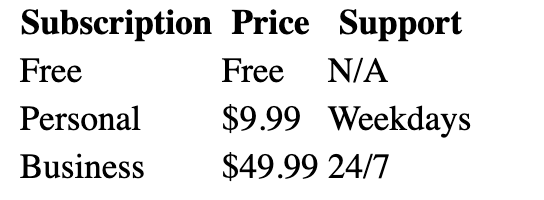
- EX 2: Practice with forms, inputs, labels, and buttons! Write a simple form with the following inputs:
- Username
- Text Input
- Should have placeholder text of ‘username’
- Make sure to properly label the input (using id/for attributes)
- Password
- Password Input
- Should have placeholder text of ‘password’
- Make sure to properly label the input (using id/for attributes)
- A Button
- With the inner text ‘Register’
- Username
- You can add in some
<div>elements for spacing, but you don’t need to: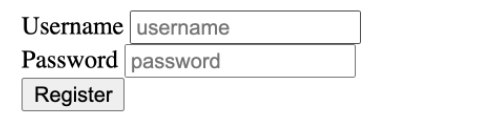
Problem Set
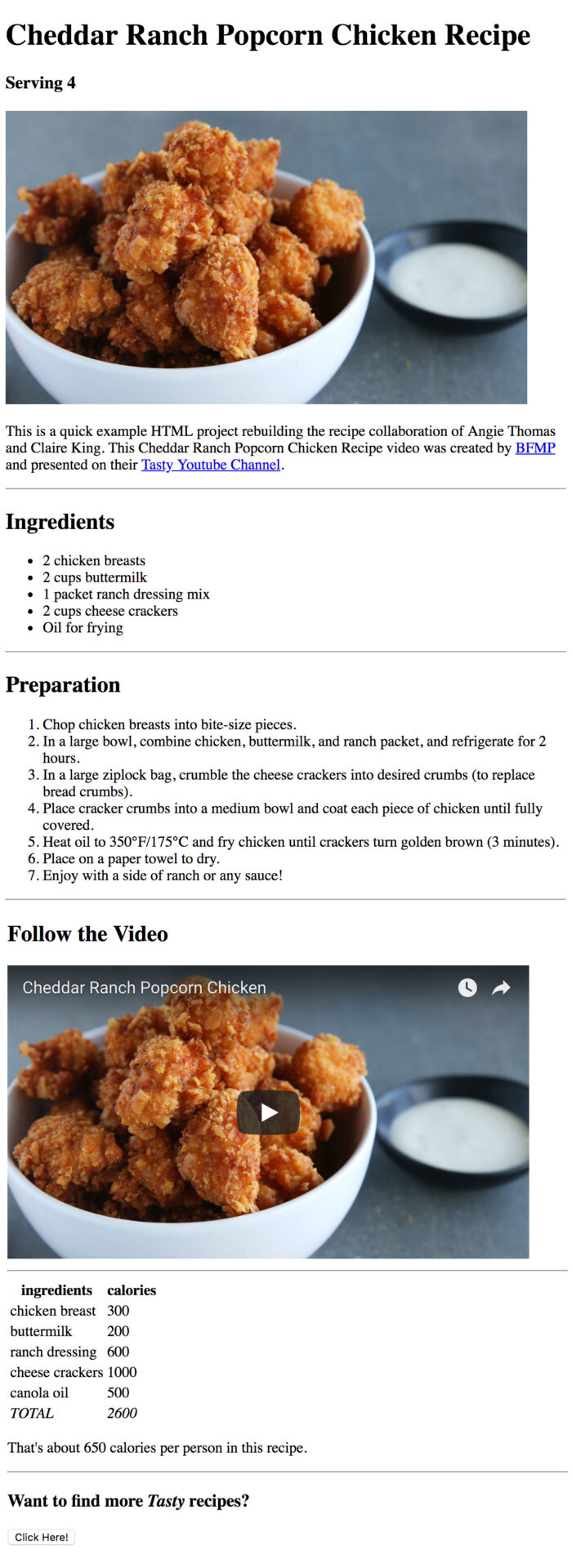
Your first project this semester will be to create an HTML only recipe page picking a recipe from Buzzfeed’s Tasty Recipe Youtube Channel playlists. You have a model to work from to structure your page (also see the image at the bottom of this post).
Recipe Requirements
- A recipe chosen from the Tasty Recipes Youtube channel
- The Recipe Title
- Serving size
- Image of the recipe remotely hosted – please try to find and use the video thumbnail by searching for the recipe name and tasty then look at the images tab – when clicked takes you to the Youtube Video page of the recipe.
- a paragraph with credits which include links
- an unordered ingredients list
- an ordered preparation list
- an embedded youtube video (you’ll have to figure this out)
- a table of ingredients and calories counted (use any resource to estimate calories)
- A button that takes you to the Tasty Recipes Youtube channel
HTML Considerations
- Use a heading tags in a pattern
<h1>,<h2>,<h3>to label sections and to set a hierarchy; - Discover and use an HTML tag to create a line spacer between sections;
- Discover and use an HTML tag to embed your Youtube video;
- Name your files appropriately and host on your server. EG:
popcorn-chicken-recipe.html
For the blog
Describe the purpose of various elements like: <header>, <footer>, <nav>, <section>, <article>, etc. How are they different from and similar to the <div> element?