Topics
Implementation of a variety of CSS properties and values to build a site homepage.
Tutorials
- 05 Project – Building a startup site, videos 052-058
- This project uses fontawesome icons but you should instead use Google font Icons for ease. But it’s up to you. If you use Fontawesome icons you will need to create an account and then create a “kit.” The kit will give a script that you can attach to the head of your HTML.
Problem set
This week’s problem set is the above code-a-long with a couple of additional requirements. You will be implementing flexbox, a reset, animations, and more. But I’d also like you to make some changes based on inventing your own start-up company. Anything you want!
You’ll need the following content, typography, colors, and assets defined:
- Give the company a name and tagline. The name is used in both the header and the center. The tagline is in the center. Also define four “package” names.
- Identify a set of seven images you’ll use for your site. You’ll need a heading image and six images to be used in the second set of tutorials (but good to identify them now). Use unsplash.com for images, but be sure to reduce the pixel dimensions and file sizes (no images larger than 1MB!)
- Identify a primary color and it’s hues (headings and/or background colors for buttons), use blacks/greys for body text. Consider a secondary color if interested.
- choose a Google font pair (heading font paired with a body text font) you can find examples here and here
- Identify four icons and labels to use in the “packages” section of your site from fontawesome or Google Icons.
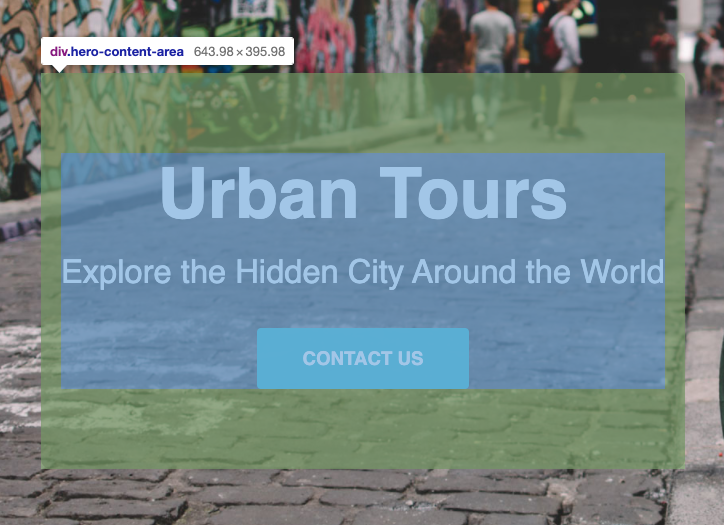
Here is an image of my example of a reworked “urban tours” website.
For the blog
Describe how the div.hero-content-area is center vertically and horizontally (hint: it’s a flex item).